Published
Dominik Chrástecký - Blog Writing Your Own Framework in PHP: Part One Writing Your Own Framework in PHP: Part One- 19 min read
Writing Your Own Framework in PHP: Part One
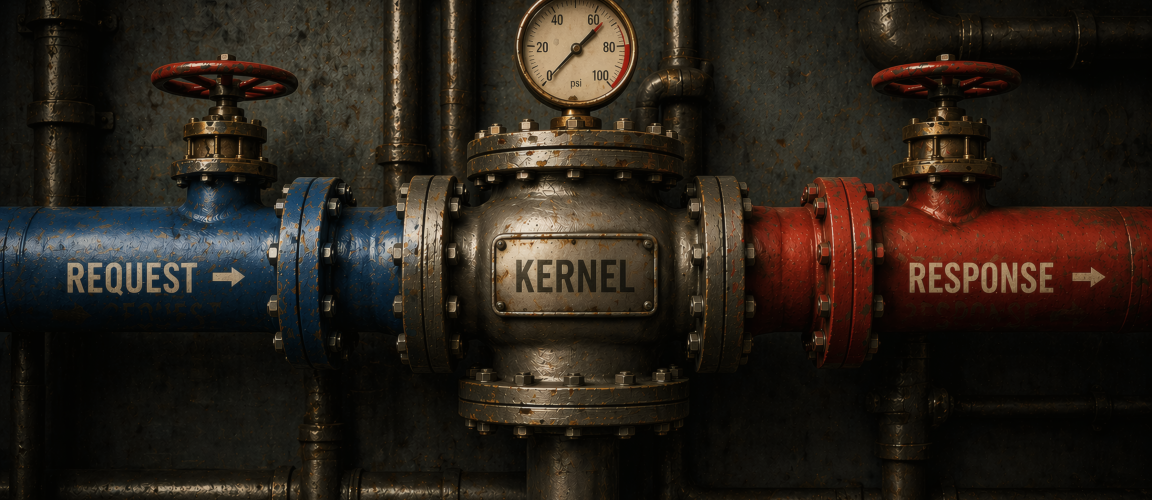
A hands-on intro to building your own PHP framework entirely from scratch — handwritten, with minimal dependencies.
What, how and why (aka the intro)
We'll be creating a Symfony/Spring inspired framework in PHP 8.5 and we'll be creating it from scratch. As for why, let me answer with a picture:

Because we can! In all seriousness, though, this is the best way to understand all the magic going on during a request. Spoiler alert: it's not that magical, actually.
What we won't be creating
We won't be creating an ORM and instead we'll wire in some existing solution when we reach that part. A similar tutorial for an ORM might come later but it would take half of this series just to get a working ORM to plug in.
We won't be creating custom templating system because it would take up another half of this series. That means we would spend half the time on templating, half on the ORM and half on the rest. That adds up to 3 halves and we don't want to break maths just so we can have custom templating, do we?
We won't be making a production-ready framework — we will intentionally not be solving all the edge cases and performance issues that you'd expect from a production-ready framework (for example, our DI container will be evaluated at runtime and not during build time) because those are the boring parts that don't help much with understanding how exactly the framework works.
We won't be creating a perfect Symfony clone — this will be written entirely from scratch without reading any other framework's source code to avoid simply copying other project's internals. I expect this decision to bite me eventually but that's gonna be part of the fun.
What will we create in Part One?
We'll be creating the very basic bootstrapping:
RequestResponseKernel- entrypoint
Step 0: Code Structure
I'll be splitting the code into two parts: app and framework. App is where the application code (like actual services, controllers etc.) will live, while framework is where all the internals will.
The most basic structure will look like this:
.
├── app
│   ├── public
│   └── src
└── framework
    └── src
Accompanied by a composer.json for autoloading:
{
  "autoload": {
    "psr-4": {
      "The\\Framework\\": "framework/src/",
      "The\\App\\": "app/src/"
    }
  }
}
If you're wondering why this split, it's to simulate our framework being installed as a dependency of our app. We could even make it actually installa ble but it would add way too much overhead. This also implies an important rule: our app can depend on our framework, but our framework cannot depend on our app.
Step 1: The Entrypoint & Kernel
The entrypoint is a script that the request first hits and it bootstraps everything. The kernel is a class that bootstraps the app and is there so that the entrypoint can be as simple as possible. The entrypoint's role is to create the Kernel and let it handle the request. The Kernel takes care of creating services, controllers, delegating the request to its handler and basically everything else (through delegation to other parts of the framework — for example the decision of which controller/action responds to a certain request is passed to a router).
Both of those live in the application and not the framework because the user might need to modify them and do something we (as the framework authors) did not anticipate. That being said, our framework must define some boilerplate the application can use (like the actual Kernel implementation for the application to extend) so it's as simple as possible. Ideally, this is what a very simple entrypoint looks like:
<?php

use The\App\Kernel;
use The\Framework\Http\Request;

require_once __DIR__ . '/../../vendor/autoload.php';

$kernel = new Kernel();
$request = Request::createFromGlobals();
$response = $kernel->handle($request);
$response->send();
The entrypoint lives inside app/public which is also what the document root is. The reason for it being hidden under the public dir is tied to security — when you point a webserver to a directory, all of its content (including child directories) becomes directly accessible through http. You can, of course, come up with rules and configurations to avoid direct access to php files and other clever tricks, but the easier solution is to simply not have the files in the document root at all. The public dir only contains files that are meant to be accessible directly, like our entrypoint or some static assets (images, javascripts, css and similar).
And this is what the application kernel should look like:
<?php

namespace The\App;

use The\Framework\Kernel as BaseKernel;

final class Kernel extends BaseKernel
{
}
In short — the default, simple case should be as simple as possible because all the complexity happens on the framework level.
Symfony currently uses a slightly different approach to the entrypoint — it uses a runtime where your entrypoint simply returns an instance of Kernel and the runtime takes care of that. While that's a smarter and better solution, it hides the bootstrapping so I decided to go the old-school manual way in this tutorial.
Step 2: Request & Response
Those are actually interconnected with the Kernel. In standard PHP you can write the response using the standard echo construct and send headers using the header() function which is everything you need to send a http response. But it's not a great way to go about it — you end up writing random headers in the middle of a controller, echoing inside a service, etc. So frameworks have decided to abstract all this into two classes: Request and Response.
You might be asking why this abstraction is needed at all. The reason is because of the "separation of concerns" principle — in PHP, you can access superglobals from anywhere. So if you want to check what a GET parameter's value is inside a html template you can do that (which doesn't mean you should). If you need that same parameter from a Request object, you have to consciously pass it from a controller to a template which makes the contract explicit instead of implicit.
Same goes for Response — you could just echo inside a template, you could send headers as part of a controller (or even a service) but then you're leaking concerns left and right and you create an unmaintainable mess pretty quickly. When you isolate all output data into a Response object, you make sure that everyone uses it and nothing else for output.
Request parses raw PHP data (like $_SERVER, $_POST, $_GET and others) into a nice object and Response acts as a single place for all your headers and body content to live in until it's eventually shown to the user of the app.
The Request needs to know everything about the user input:
- scheme
- host
- path
- query
- body
- headers
- cookies
- and others
For now, let's define the request as a simple object with the following properties:
final readonly class Request
{
    /**
     * @param array<string, string> $query
     * @param array<string, string> $headers
     * @param array<string, string> $cookies
     */
    public function __construct(
        public string $scheme,
        public string $host,
        public string $path,
        public string $method,
        public ?string $body = null,
        public array $query = [],
        public array $headers = [],
        public array $cookies = [],
        public array $files = [],
    ) {
    }
}
It hosts all the things I mentioned (and more). Most of it is pretty self-explanatory, some things worth noting:
- files are not typehinted, we'll eventually build an abstraction over them but it's out of scope for now.
$headersare typehinted asarray<string, string>, even though correctly it should bearray<string, array<string>>— it's valid to send the same header multiple times. We'll just skip this for our implementation.
PHP provides us with all that information, but we need to parse it out of PHP's superglobals:
    public static function createFromGlobals(): self
    {
        $isHttps = isset($_SERVER['HTTPS']) && $_SERVER['HTTPS'];
        $scheme = $isHttps ? 'https' : 'http';
        $body = file_get_contents('php://input') ?: null;

        try {
            [, $files] = request_parse_body();
        } catch (RequestParseBodyException) {
            $files = $_FILES;
        }

        $requestUri = $_SERVER['REQUEST_URI'];
        $path = parse_url($requestUri, PHP_URL_PATH);

        return new self(
            scheme: $scheme,
            host: $_SERVER['HTTP_HOST'],
            path: $path,
            method: $_SERVER['REQUEST_METHOD'],
            body: $body,
            query: $_GET,
            headers: getallheaders(),
            cookies: $_COOKIE,
            files: $files,
        );
    }
Notes on implementation:
- detecting whether we're using https is by checking whether the
$_SERVERarray contains the'HTTPS'key with a non-empty value, based on that we decide whether we're on https or http $bodymust be populated before callingrequest_parse_body()— it consumes the value and it would not be availablerequest_parse_body()makes it possible to get the$_POSTand$_FILESarray even for requests that are not of the method POST (e.g. PUT, PATCH), we gracefully fall back to providing$filesas the original$_FILESarray.- PHP doesn't provide us with the path alone (it includes query string as well) so we need a little help of the
parse_url()function - we use
getallheaders(), that function might not be available under all environments, but should be in all of the important ones (FPM, Apache, FrankenPHP)
With that out of the way, two of our four entrypoint lines now work!
$kernel = new Kernel(); // works
$request = Request::createFromGlobals(); // works
$response = $kernel->handle($request); // does not work
$response->send(); // does not work
For this part in the series we'll skip line 3 and go straight to creating the response object.
Response
The response is what's returned to the user's browser and consists of the content (body), status code and the headers, it can be modeled like this:
final readonly class Response
{
    /**
     * @param array<string, string> $headers
     */
    public function __construct(
        public string $body,
        public StatusCode $statusCode = StatusCode::OK,
        public string $contentType = 'text/html',
        public array $headers = [],
    ) {
    }
}
Some notes:
- I decided to use an enum for the status code instead of a simple integer
- content type does not have to be separate but it's such a common header that I decided it's worth having a separate name
- headers are a direct access array for now but in later parts we'll be hiding the array behind methods because the keys need to be case insensitive
Now that we have the Response object, we need to actually send it. From the entrypoint we can see that it uses $response->send() — let's define it!
    public function send(): void
    {
        $this->sendHeaders();
        $this->sendBody();
    }
I'm splitting it into two, let's start with the simpler one:
    private function sendBody(): void
    {
        echo $this->body;
    }
Yep, as easy as that — just echo the content. Now for the headers:
    private function sendHeaders(): void
    {
        if (headers_sent($filename, $line)) {
            throw new HeadersAlreadySentException("Cannot send headers, the headers have been already sent in {$filename} on line {$line}");
        }

        http_response_code($this->statusCode->value);
        foreach ($this->headers as $name => $value) {
            header("{$name}: {$value}");
        }
        header("Content-Type: {$this->contentType}");
    }
First we check whether headers have been already sent and if so, we throw an exception. Outside manually sending headers using the header() function, this also happens when you (accidentally) echo or var_dump() or write output in any other way. Then we send the status code and headers and we're done.
Step 3: Wiring It Up
Right now the code doesn't run because the handle() method of the Kernel does not exist. We won't be implementing it properly just yet, but looking at the contract we can see that from the outside point of view it simply takes a request and returns a response. So if our goal is to just make the code run (which it is for now), we can easily fake it!
Inside the framework Kernel we add this:
    public function handle(Request $request): Response
    {
        return new Response(
            body: '<strong>Hello</strong> <em>world</em>!',
        );
    }
And now all our code is perfectly valid, if a little simplistic for a framework!
When I run the server (for example by running cd app/public && php -S 127.0.0.1:8000 from the root of the project) and open my browser at http://127.0.0.1, I can see a beautiful:
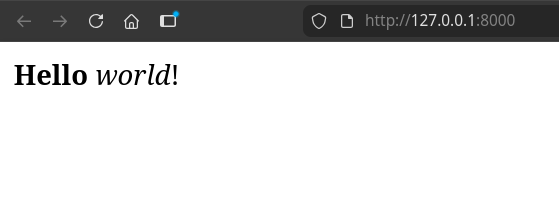
We can be a little fancier and actually make use of the request object!
    public function handle(Request $request): Response
    {
        $name = $request->query['name'] ?? 'world';

        return new Response(
            body: "<strong>Hello</strong> <em>{$name}</em>!",
        );
    }
We default to "world" if no name GET parameter exists, but if it does, we show the name instead. And sure, navigating to http://127.0.0.1:8000/?name=Dominik shows "Hello, Dominik!" instead.
Summary of changes
It might seem we accomplished little but we already did something very important: We built abstractions for the HTTP request and response and established the basic structure of the lifecycle of our app. You can already see that having the structure separated like this, we could simply provide a fake handle() method without changing any of the other code which is exactly why abstractions like these exist.
The next part will be smaller and will consist of a little bit of tidying up the request and response object (let's call it part 1.5) while the part after that will focus on creating controllers and routing. And maybe we'll even handle the XSS vulnerability we introduced!
Side note: Feel free to offer ideas for our awesome framework's name cause right now it's just called "The" framework which is not ideal. On the bright side, this would mean someone finally managed to find a name that's even harder to search for than Go!
Comments
No comments yet.